
I still remember the frustration. I was deploying a Next.js app in a Docker container for the first time. I dutifully set my NEXT_PUBLIC_API_URL variable using the docker run -e command, thinking I had followed best practices. But when the app loaded, the API calls failed. Popping open the browser console, I saw the value was undefined. How could that be? I had injected the variable directly into the container's environment!
That experience was my introduction to a crucial concept: in modern frameworks, not all environment variables are created equal. The variable I injected at runtime was invisible to the Next.js build process that had run much earlier. This guide is born from that confusion. We'll walk through the different levels where envs "live"—from the OS to the container, and from build-time to runtime—so we can finally understand why a variable might be present in our terminal but undefined in our code.
1. What Are Environment Variables?
In simple terms, an environment variable is a KEY=VALUE pair that lives outside our application's code. Think of it as a sticky note we give to a program before it runs. The program then reads this note to adjust its behavior accordingly.
Why are they so critical for modern development?
- Security: We can store sensitive data like API keys, database passwords, or secret tokens outside our source code. This keeps our codebase "clean" and safe to commit to a public Git repository.
- Flexibility: The exact same application code can run in different environments (development, staging, production) simply by changing its envs. We don't need to touch a single line of code. For example, our
DATABASE_URLon a laptop will differ from theDATABASE_URLon the production server. - Portability: This concept is a cornerstone of cloud-native applications. Our app isn't tied to a specific machine's configuration; it adapts to the environment in which it's executed.
2. Understanding the Levels of Environment Variables
The key to mastering envs is knowing where and when they "live." Let's break down each level.
a. The OS (Host/Server) Level
This is the most fundamental level. Variables are set directly within the host operating system (a VPS, an EC2 instance, etc.) and are inherited by all processes running on it.
- How We Set Them:
- On a traditional VPS (e.g., Ubuntu): We can add
export VAR_NAME="value"to shell-specific files like~/.bashrc, or for system-wide access, addVAR_NAME="value"to/etc/environment. The latter makes the variable available to all users and services. - On AWS EC2: We can pass a script through User Data on instance launch to export variables.
- On AWS ECS (with EC2 launch type): We can configure variables in
/etc/ecs/ecs.configon the container instance, which the ECS agent then uses.
- On a traditional VPS (e.g., Ubuntu): We can add
- When They're Active: From the moment a user logs in or a system service starts.
- Study Case: A Next.js App on Different Hosts Let's say we have a Next.js application that needs to know its running environment and the API endpoint it should call.
- On EC2/ECS: A more scalable approach is to set this at the container level. But if we had a non-containerized app on EC2, or needed to provide a URL to the ECS agent itself, we might set it in the instance's configuration. For our Next.js app, we'll quickly see this isn't the best place for application-specific config.
- Pros & Cons:
- (+) Pro: Centralizes configuration for multiple processes on a single machine.
- (-) Con: It's a blunt instrument. It lacks isolation. If we need another app on the same server to run with
NODE_ENV=development, we immediately have a conflict. This approach is not portable and scales poorly.
On a VPS: We want all Node.js apps to default to production mode. We edit /etc/environment:
# /etc/environment on a VPS
NODE_ENV=production
b. The Container (Docker/ECS) Level
This is the standard practice in the cloud-native world. Envs are injected specifically into the isolated environment of a container.
- How We Set Them:
- At Build-Time: Using the
ENVinstruction in aDockerfile. - At Run-Time: Using the
-eflag indocker run, theenvironmentkey indocker-compose.yml, or through task definitions in orchestrators like AWS ECS and ConfigMaps/Secrets in Kubernetes.
- At Build-Time: Using the
- The Golden Rule of Precedence: An env set at runtime always overwrites an env of the same name set at build-time.
- Pros & Cons:
- (+) Pro: Isolated, portable, and the industry standard. Configuration is tied to the application, not the machine.
- (-) Con: If we "bake" a sensitive value into the image (e.g.,
ENV API_KEY=...in the Dockerfile), the image itself becomes a security liability. Anyone with access to the image can inspect it and find the secret.
Study Case: A Flexible Next.js Docker Image We are building a Docker image for our Next.js app. We want to provide a default port but allow it to be changed easily. Our Dockerfile:
# Dockerfile
FROM node:18-alpine
WORKDIR /app
COPY . .
# Set a default value at build-time
ENV PORT=3000
EXPOSE 3000
CMD ["npm", "start"]
By default, the app will run on port 3000. But on our production server, that port is already in use. We can run it with a new env without rebuilding the image:
# The runtime env overwrites the build-time env
docker run -p 8080:8080 -e PORT=8080 my-nextjs-app
The app inside the container will now listen on port 8080.
c. The Build Process Level (Next.js Specific)
Modern frameworks like Next.js introduce a concept of envs that only exist during the build process. The values of these variables are directly substituted into the static JavaScript and HTML files that are generated.
- A Helpful Analogy: Think of this like screen-printing a T-shirt. The
NEXT_PUBLIC_variable is the design. During thenext buildprocess (the printing press), that design is permanently inked onto the T-shirt (the JavaScript file). Every shirt that comes out has the same design for all to see. To change it, we must make a new batch of shirts. - How We Set It (in Next.js): The variable name must be prefixed with
NEXT_PUBLIC_. - When It's Active: Only during the execution of
npm run buildornext build. Afterwards, its value becomes a hardcoded constant in the public-facing code. - Study Case: Exposing a Public Key to the Browser Our Next.js app needs to fetch data from a public API on the client side. We set the variable in our CI/CD system or
.env.localfile:NEXT_PUBLIC_API_URL="https://api.production.com/v1". In our React component, we useprocess.env.NEXT_PUBLIC_API_URL. When we runnext build, Next.js replaces that code with the literal string"https://api.production.com/v1"in the JavaScript bundle. If we change this variable, we must rebuild our application. - The Danger Zone: Never use the
NEXT_PUBLIC_prefix for secrets (private API keys, database credentials). Anything prefixed this way is publicly visible.
d. The Runtime Process Level (The Running App)
These are the envs read by our application once it's already up and running inside the container on the server. This is the traditional and most secure method for handling server-side configuration.
- A Helpful Analogy: This is like a security guard's daily password. The guard (our server process) is given the secret password (
DATABASE_URL) right before their shift starts (docker run). It's a secret they never share with the public. We can give them a different password tomorrow without having to rebuild the entire building (our Docker image). - How We Set Them: The same way as container-level runtime variables (
docker run -e, ECS Task Definitions). - When They're Active: When the main application process (e.g.,
node server.js) starts. Our app readsprocess.envto get its configuration.
Study Case: Handling Secrets in a Next.js API Route Our Next.js app needs to connect to a database and process payments with Stripe. We inject these secrets when we run our container:
docker run -d \
  -e DATABASE_URL="postgresql://user:pass@prod-db:5432/main" \
  -e STRIPE_SECRET_KEY="sk_live_..." \
  my-nextjs-app
Inside our API route (pages/api/checkout.js), which only runs on the server, we can safely use process.env.STRIPE_SECRET_KEY. It's only accessible within the Node.js server environment, keeping it completely safe from the client's browser.
3. Best Practices: Where Should We Set Our Envs?
Let's use this simple matrix as our guide:
Type of Data
Example
Recommended Level
Reason
Highly Sensitive Data
DATABASE_URL, API_SECRET_KEY
Runtime Process
The value never touches the build artifact (Docker image), making it the most secure option.
Public Data for Client
NEXT_PUBLIC_API_URL
Build Process
Required by the browser. It's efficient because the value is embedded directly.
Non-Sensitive Defaults
PORT=3000, NODE_ENV=development
Container Build (Dockerfile)
Provides sensible defaults but can be easily overridden at runtime for flexibility.
Global Machine Config
HTTP_PROXY
OS Level
Used rarely for apps, but useful for settings that apply to all processes on a machine.
Troubleshooting Tips for When "My Env Isn't Loading"
- Wrong Level: Are we setting an env at runtime (
docker run -e) when Next.js needs it at build-time (aNEXT_PUBLIC_var)? This is the most common cause of this issue. - Missing
NEXT_PUBLIC_Prefix: If we need an env in a React component (client-side), it must have the prefix. Otherwise, Next.js intentionally strips it for security. - Precedence Conflict: Is there an env with the same name at the OS level, in the
Dockerfile, and in thedocker runcommand? Remember, the last one (runtime) always wins. - Verify Inside the Container: To be absolutely sure, let's shell into the running container and check what it sees:
docker exec -it <container_name> sh -c "printenv".
The "Why is it undefined?" Example: See what happens in a component:
// In a React Component (e.g., pages/profile.js)
function UserProfile() {
  // This works because it's baked into the browser's JS file.
  const apiUrl = process.env.NEXT_PUBLIC_API_URL;

  // This will ALWAYS be `undefined` in the browser for security.
  const dbPassword = process.env.DATABASE_PASSWORD;

  console.log('API URL:', apiUrl); // -> "https://api.production.com/v1"
  console.log('DB Password:', dbPassword); // -> undefined

  return <div>...</div>
}
Frontend Focus: The Two Golden Rules
If you're coming from a frontend background, keep these two rules in mind above all else:If it's for a React Component, it MUST start with
NEXT_PUBLIC_. The variable will beundefinedin the browser otherwise. No exceptions.Changing aNEXT_PUBLIC_variable requires a NEW BUILD. Simply restarting the server isn't enough. You must runnpm run buildagain because the value is part of the code itself.
4. Visualizing the Environment Flow
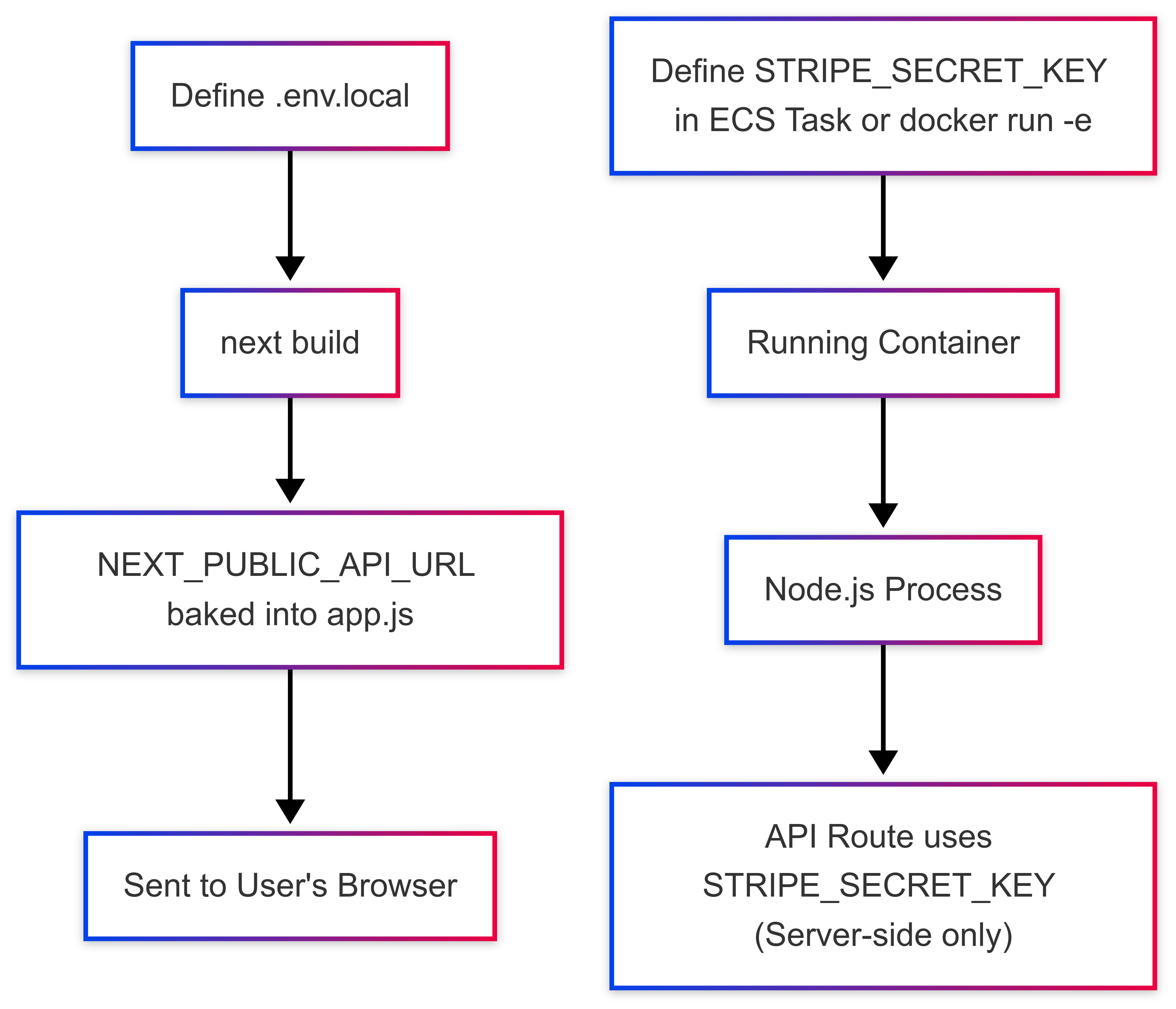
To tie it all together, let's trace the two distinct paths an environment variable can take:
Path 1: The Public Frontend Variable (The "T-Shirt") [.env.local file] -> next build -> NEXT_PUBLIC_API_URL gets permanently "baked" into -> /_next/static/chunks/app.js -> Sent to User's Browser.

Path 2: The Private Backend Variable (The "Secret Password") [ECS Task Definition / docker run -e] -> STRIPE_SECRET_KEY is injected into -> [Running Container] -> [Node.js Process] -> Accessed by API Route on the Server (Never leaves the server).
Conclusion
Managing environment variables is more than just making an application run; it's about engineering a system that is secure, maintainable, and robust. By understanding the distinct roles of the OS, Container, Build, and Runtime levels, we can make informed decisions.
Let's commit to these golden rules:
- Separate configuration from code.
- Keep secrets out of our source code and especially out of our Docker images.
- Inject secrets only at runtime.
By embracing these principles, we'll not only save ourselves from future troubleshooting headaches but also build more professional and resilient applications.
Bagikan[](https://twitter.com/share?text=A Practical Guide Environment Variables: A Guide from OS to Next.js&url=https://blog.naufaldi.com/a-practical-guide-environment-variables-a-guide-from-os-to-next-js/ "Twitter")[](https://www.linkedin.com/shareArticle?mini=true&url=https://blog.naufaldi.com/a-practical-guide-environment-variables-a-guide-from-os-to-next-js//&title=A Practical Guide Environment Variables: A Guide from OS to Next.js "LinkedIn")
Topik Documentation Getting Started Lesson Learned
[
AI Context Engineering: How to Level Up Prompting, Context, and Output with Modern Tools
Most developers blame the AI when they get bad answers. The truth?…
22 Jul 2025
](/ai-context-engineering-how-to-level-up-prompting-context-and-output-with-modern-tools/)[
Coming soon
This is Cerita Faldi, a brand new site by Naufaldi Rafif S…
26 Jun 2025
](/coming-soon/)